Tag: custom

  • A Tale of Two Platforms: Automating the Same Machine, Two Very Different Ways

    A Tale of Two Platforms: Automating the Same Machine, Two Very Different Ways

    A Tale of Two Platforms: Automating the Same Machine, Two Very Different Ways

    Over the past few weeks, I took on a technical challenge: Automate the same Universal Material Testing Machine using two completely different platforms.

    Once with TACTUN, our no-code control platform.
    And once with LabVIEW + CompactRIO from National Instruments.

    The machine stayed the same. The control goals were identical. Only the platform changed.

    I didn’t set out to crown a winner — just to see how the process unfolds from an engineer’s seat, and where each approach shines (or struggles) when applied to real-world machine automation.

    The Setup: Familiar Ground

    The machine used a DC motor with an encoder for position feedback, a strain-gauge load cell for force measurement, digital inputs for E-Stop and limit switches. Pretty standard setup.

    On the hardware side:

    • LabVIEW + CompactRIO:
      • cRIO-9033 embedded controller
      • NI-9237 strain/bridge input module (for load cell)
      • NI-9403 5V/TTL configurable digital I/O interface module (for digital inputs)
      • NI-9505 full H-bridge brushed DC servo motor drive module (for PWM and encoder)
    • TACTUN:
      • TCM-10203-H — our latest-generation industrial controller
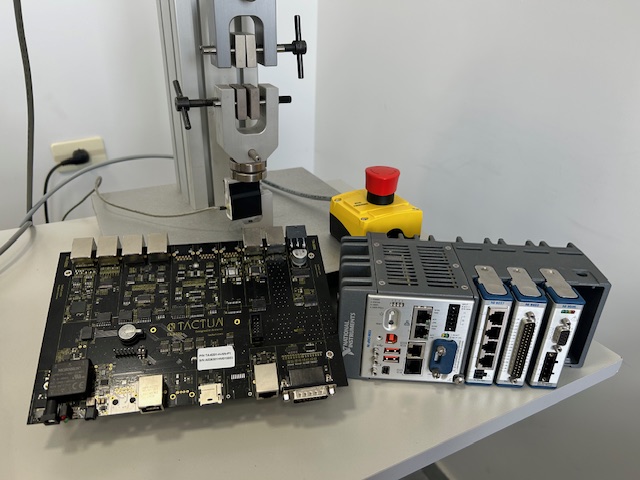
    cRIO and TACTUN Controller

    Step 1: Wiring It All Up

    With TACTUN, I opened the platform, defined sensor and actuator types, assigned them to controller channels, and got instant live data. It was a 20-minute visual configuration sprint — like snapping together LEGO blocks.

    LabVIEW, as expected, was more involved.

    I started by creating a new project, assigning C-Series modules, mapping out FPGA resources, and initializing communication loops. Some components — like PWM and encoder reading — were borrowed from earlier projects we’d done in the past. They weren’t copy-paste ready, but they saved hours of low-level work.

    It still took me about half a day to get everything booting, compiling, and talking.

    Step 2: Sensor Calibration + PID Control

    Calibration is one of those things you want to do once and never touch again.

    In TACTUN, it was exactly that. I used the built-in piecewise calibration tool for the load cell and a simple linear conversion for the encoder. Then, directly from the dashboard, I selected the Control Stage widget, configured the PID settings, and ran the motor — no coding involved.

    On the LabVIEW side, I used the built-in PID VI from the FPGA library, so I didn’t have to implement the control loop from scratch. However, setting it up still required configuring inputs, exposing tuning parameters, and wiring up the logic. Calibration functionality was added in the RT layer, and at this point, I tested everything using the RT front panel — no host application yet. While I reused logic from previous projects, adapting it to this setup still took a few focused hours.

    Step 3: Real-Time Data Streaming

    I wanted both platforms to stream live data — force and position — to a graph on the host PC.

    In TACTUN, this was straightforward: I added a couple of graph widgets to the dashboard, selected the signals, and set the sampling rate. Done in under 3 minutes.

    LabVIEW was a different beast. I implemented FPGA → RT communication using DMA FIFOs, then wrote a DMA data handler in the RT layer, as well as queue to transfer the data stream from DMA data handling loop to host communication loop. From there, I used Network Streams to send structured packets to the host PC. Error handling, reconnection logic, queued data transfer — it became a small project of its own. This step alone stretched into multiple days.

    Step 4: Motion Profiles and Function Generator

    For the final milestone, I needed a function generator to control the actuator: sine, ramp, square wave — each with customizable parameters like amplitude, frequency, and cycle count.

    In TACTUN, this was a single widget: Control Stage. I added it to the dashboard, chose “Sine,” entered amplitude, mean, frequency and cycles, and hit “Run.” The motor responded immediately with a smooth, controlled profile. I adjusted PID gains on-the-fly.

    In LabVIEW, I wrote the waveform generator in FPGA. Then I created a config panel in the Host app, added transfer protocols to send the waveform to RT, and from RT to FPGA. Testing each waveform took time. Debugging took more.

    The full stack — UI → RT → FPGA — ended up taking more than a week.


    Development Time: A Breakdown

    Here’s a rough summary of how much time each part of the process took — broken down by development type:

    Task
    TACTUN
    LabVIEW + cRIO
    Sensor & I/O Setup
    ~20 min (visual config)
    ~4 hrs (FPGA + RT setup + debug)
    Sensor Calibration
    ~1.5 min
    ~3.5 hrs (RT coding + test)
    PID Control
    Built-in
    ~1.5 hrs (FPGA implementation + RT configuration)
    Data Streaming
    ~2.5 min
    ~1.3 week (DMA + Network Streams + UI)
    Motion Profile Generator
    ~1.5 min (widget config)
    ~1.1 weeks (FPGA + RT + UI + comms + test)
    Total Active Development Time
    ~30 min
    ~2.5+ weeks (with prior code reuse)

    On average, development tasks took over 230X longer to implement in LabVIEW compared to TACTUN.

    Learning Curve: Getting up to Speed

    Understanding how long it takes to become productive with each platform is equally important.

    With TACTUN, you can get started in a day:

    • No coding needed — everything is configured visually

    • Guided workflows for I/O setup, calibration, control, and UI

    • If you’re familiar with sensors and actuators, you’ll feel at home quickly

    With LabVIEW + CompactRIO, the ramp-up is significantly longer:

    • NI’s recommended Core 1 & 2 training takes 5 full days, just to cover the basics

    • Working with Real-Time and FPGA requires:

      • Understanding LabVIEW’s dataflow model

      • Learning multitasking, timing control, DMA communication

      • Debugging across multiple abstraction layers

    • In reality, it takes several weeks to be productive, and months to become confident — especially with more complex applications

    Strengths & Tradeoffs — When to Use Which?

    While this experiment focused on a single material testing machine, the patterns I observed hold true across the majority of such systems — whether it’s a simple UTM, a high-speed fatigue tester, or a multi-axis servo-hydraulic rig.

    Here’s a breakdown of the platform-specific strengths and tradeoffs from that perspective:

    Criteria
    TACTUN
    LabVIEW + cRIO
    Development Time
    Extremely fast — most tasks completed in hours thanks to built-in logic and visual tools
    Long — from weeks to months, especially when building features from scratch
    Ease of Use
    Intuitive for non-programmers; drag-and-drop UI design, guided flows
    Requires programming expertise (FPGA, RT, Host), steeper learning curve
    Flexibility & Granularity
    Limited low-level access (by design); optimized for common testing applications
    Full access to hardware internals; ideal research-grade modifications
    Visualization & UI
    Built-in dashboard widgets for control, monitoring, and test execution. Custom button widget creation.
    Requires custom UI development; more flexibility, but more effort. Almost no scaling (requires significant efforts)

    From my experience during this project — and based on many conversations with machine builders — each platform clearly aligns with a different type of user and use case.

    TACTUN is a great fit for:

    • Small to mid-sized manufacturers

    • Teams looking to eliminate repetitive engineering and accelerate delivery
    • Applications where speed, repeatability, and a polished end-user experience matter more than deep customization

    If your goal is to ship production-ready machines quickly — without building everything from scratch — TACTUN helps you move fast without sacrificing quality or flexibility within standard test workflows.

    LabVIEW + CompactRIO, on the other hand, is ideal when:

    • You’re doing advanced R&D or academic work

    • You need complete control over every part of the system

    • You’re working with novel sensors, non-standard hardware, or want to prototype entirely new control schemes

    It remains a powerful platform when you’re pushing the boundaries of what a machine can do — and when your team has the time and expertise to build that control stack from the ground up.


    Closing Thoughts

    This project wasn’t about speed records or pitting platforms against each other. It was about transparency — and curiosity. I wanted to explore what it really feels like to build the same machine behavior using two very different tools.

    • One platform leaned on abstraction, ease, and speed.
    • The other offered fine control and flexibility, but demanded more from the developer.

    If you’re a machine builder, or R&D engineer — I hope this comparison helps you choose the right path for your next build.

    Share this post:
  • Building the Brain for Machinery: Under the hood of  TACTUN’s Technology

    Building the Brain for Machinery: Under the hood of TACTUN’s Technology

    Building the Brain for Machinery: Under the hood of TACTUN’s Technology

    A deep dive into the custom hardware, edge logic, and cloud platform powering the next generation of machinery.

    In an era where industrial machines must be smarter, faster, and more autonomous, TACTUN is rethinking how control systems are designed and deployed. At the heart of this transformation is a full-stack platform — spanning from a custom-built hardware controller to a cloud-based deployment environment and application builder.

    This post takes you under the hood of TACTUN’s technology, breaking down how we build the “brain” for smart machinery.

    The Architecture: One Brain, Two Sides — Hardware + Software

    The TACTUN platform is built around a unified architecture composed of two deeply integrated parts:

    A custom embedded controller, designed per customer, and
    A cloud-powered software platform, enabling no-code product design, application generation, and remote updates.

    Together, these components replace traditional general-purpose controllers, modular PAC systems, and standalone HMI software with a single, tightly coupled stack — optimized for control, intelligence, and scale.

    At the machine level, TACTUN’s controller operates as the real-time decision-making unit, doing data acquisition, close-loop control, running deterministic logic, and motion control on-device. At the user level, engineers and machine builders interact through a software environment to define logic, generate desktop apps, and manage their fleet — all without writing code.

    The Hardware: Custom-Built, FPGA-Driven Control

    TACTUN starts with a fully custom controller tailored to each customer’s I/O and control needs. Unlike traditional modular PLCs or PACs, our architecture eliminates overhead by embedding everything on a single PCB.

    Each controller features:

    • High-performance FPGA SoC for deterministic, low-latency control
    • Up to 100 kHz closed-loop rate and 32-bit motion resolution
    • Sub-10μs multi-axis synchronization
    • Native support for 20+ industrial sensor types, including LVDT, RTD, load cells, encoders, etc.
    • Integrated support for actuators like servo-hydraulic, piezo, stepper, and DC

    These capabilities are critical for machines that demand precision, speed, and tight control loops — especially in sectors like materials testing, motion control, or robotics.

    TACTUN Custom Board

    The FPGA executes high-deterministic/critical tasks like PID loops, signal filtering, safety checks, and time-critical control patterns. Logic is implemented at the hardware level, ensuring minimal latency and zero reliance on operating systems.

    The result: minimal latency, ultra-high precision, and full adaptability delivered at scale, with zero NRE fees and a repeatable design per customer.

    Looking forward, TACTUN is introducing a new class of controllers with onboard AI Compute power. This enables custom AI-model inference, Custom deployments of VLM and VLAM — right at the edge, without cloud dependency. The first model of controller will be based on NVIDIA technology.

    The Software Platform: Cloud-Based Machine Design and Build

    TACTUN’s no-code platform runs entirely in the cloud and serves as the “development” environment for machinery builders.

    Using the platform engineers can:

    • Define I/O, sensor and actuator configurations
    • Set up operational sequences, and safety rules
    • Configure waveforms and motion profiles
    • Design custom, white-labeled UI screens for operators

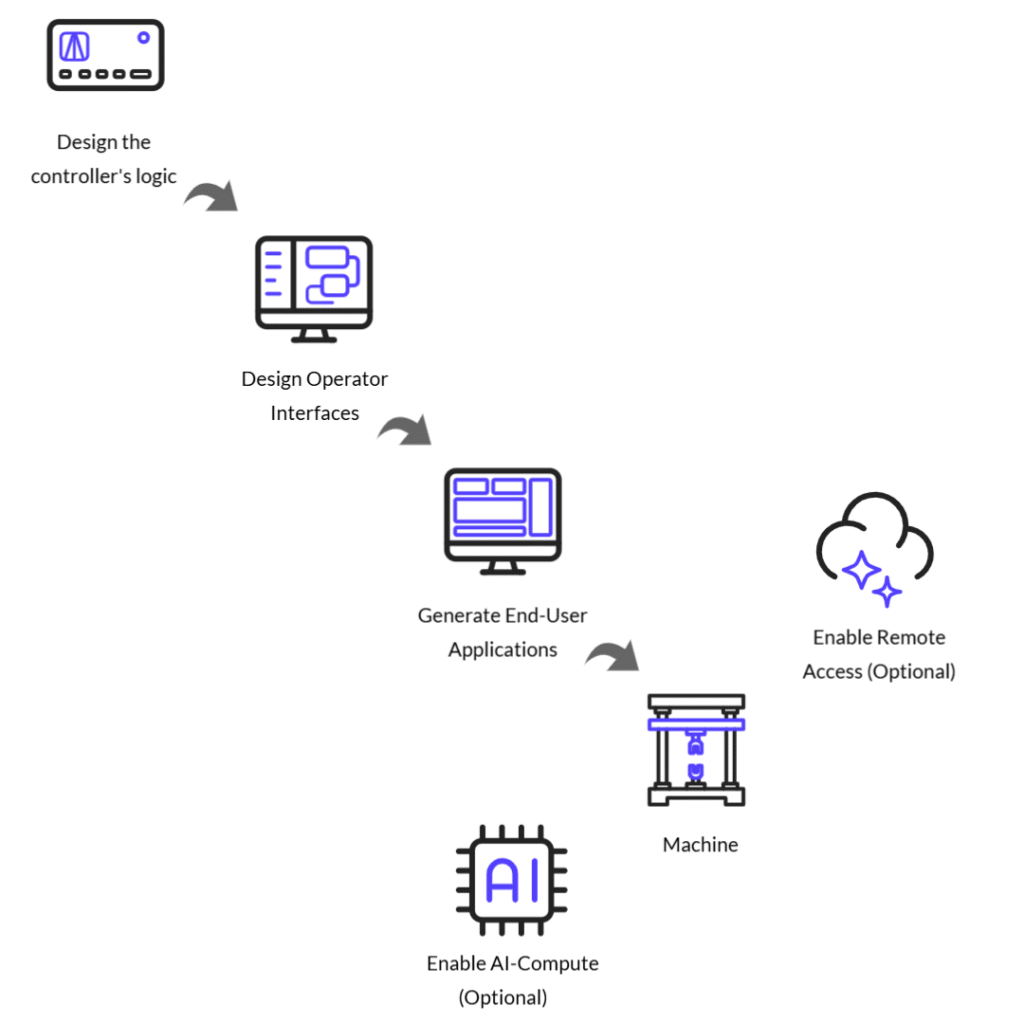
    Once the product design is finalized, the platform provides a one-click build process, which compiles everything into a standalone Windows installer — the machine’s end-user interface. This build process runs entirely in the cloud, allowing machine builders to generate multiple apps for different customers and machine models or versions without needing any software development tools.

    Design Flow

    Standalone Desktop Application: Fully Packaged End-User Interface

    The output of the cloud-based platform is a white-labeled standalone Windows desktop application, tailored to the exact configuration created by the machine builder, linked to the exact controller. This app is designed for use by the end customer — typically the machine operator — and does not require internet access, cloud connectivity, or a runtime environment.

    Once installed on a PC, the application communicates directly with the TACTUN controller over Ethernet. It automatically detects the controller and loads the appropriate logic, allowing the operator to interact with the machine using an intuitive interface.

    The application is white-labeled with the manufacturer’s branding and can include:

    • Real-time dashboards for monitoring signals, sensors, and machine status
    • Control panels for manual or semi-automatic operation
    • Graphing and waveform visualization tools
    • Data logging, reporting and export features for QA or audit purposes.

    What makes this application powerful is its flexibility. Every feature, control logic, and interface element is defined by the machine builder during the product design process.

    Additionally, user permissions can be configured within the build process. This allows the builder to define distinct access levels for different end-user roles — for example, restricting access to calibration or setup screens, while providing operators with a simplified view focused only on essential controls.

    The result is a clean, purpose-built application, fully aligned with the machine’s logic and brand, and ready for deployment in production environments — no custom development, no integration effort.


    Closing Thoughts

    At TACTUN, we believe the future of machinery is autonomous. That future demands a new way of Research and Development, such that does not require programming skills. You can call it Vibe coding for machinery. This also requires a new kind of “brain” —controller, one that blends real-time control, cloud flexibility, and human-friendly tools.

    If you’re building machines that need to think, sense, and act with precision, we invite you to build with us.

    Share this post:

  • Great Machines Deserve Better Dashboards — Built with TACTUN

    Great Machines Deserve Better Dashboards — Built with TACTUN

    Great Machines Deserve Better Dashboards — Built with TACTUN

    In industries like materials testing, mining, construction, energy, machine operators are under pressure to perform flawlessly — often while juggling multiple variables like load profiles, safety margins, thermal drift, or pressure calibration.

    But legacy dashboards often fail them:

    • Too many tiny numbers on one screen.
    • Hidden critical indicators.
    • Controls that behave inconsistently.

    These aren’t just annoyances — they can be dangerous and expensive.

    TACTUN’s no-code platform gives manufacturers the power to design fully custom dashboards, tailored to both machine logic and human logic. And it matters.

    Understanding the Human Brain: 3 Biases You Must Design Around

    Let’s walk through 3 well-known cognitive biases backed by UX science and show how custom dashboards build with TACTUN platform can help industrial machine builders design around these biases.

    1. Change Blindness

    “If I don’t notice it, I can’t respond.”

    The Risk: In long-cycle tests or steady-state control, even significant changes (like force drop or temperature rise) may go unnoticed unless the UI draws attention clearly.

    TACTUN features that help:

    • Visual widgets that change color or text upon reaching set thresholds (green → red).
    • Use of alerts tied to digital outputs (e.g., buzzers, lamps).
    • Real-time graphs for measurements and command signals.

    Configuring Warning Widget

    Configuring External Buzzer with Digital Output Through Rules

    2. Hick’s Law

    “Too many options = slower decisions.”

    The Risk: Overloaded dashboards delay operator reaction time. Hick’s Law tells us decision time increases with the number of choices presented.

    TACTUN features that help:

    • Test specific dashboards: Simplified dashboards with only minimum number of required widgets.
    • Custom Button Widgets: Replace complex multi-step procedures with single-button actions that execute predefined sequences. This minimizes error-prone manual steps and improves repeatability across operators.
    • Context-Aware Controls: Prevent misuse or accidental triggering by dynamically disabling buttons or UI elements when they’re not applicable or safe to use (e.g., “Release Clamp” is disabled until test completes). This enforces procedural safety and guides correct behavior.

    Setting Rules to Enable/Disable Jog Buttons

    3. Recency Bias

    “The last thing I saw is what I remember.”

    The Risk: After a long test, operators often recall only the final values, not the whole progression.

    TACTUN features that help:

    • Auto-logging of graphs and screen states.
    • Snapshot and export buttons with one-click report generation.
    • Offline viewer with machine builders defined dashboard layout.

    Running Test and Generating Report

    What Manufacturers Can Build

    The TACTUN platform is more than a dashboard builder — it’s a full-cycle development environment for machine manufacturers. Without writing a single line of code, OEMs can design and deliver custom control logic, operator UIs, and end-user applications tailored to each machine they build.

    Here’s what manufacturers can build using TACTUN:

    1. Control Logic & Automation Rules
    2. Dashboards & Operator Interfaces
    3. Machine-Specific Windows Applications with Builder’s Brand

    The TACTUN platform can generate a Windows desktop application that your end-users will install and run on their PC.

    This application:

    • Interfaces directly with the controller hardware
    • Includes your custom UI and logic
    • Requires no internet connection or cloud dependency (in the Own & Deploy model)
    • Can be distributed under your brand, as a full software product for your machine

    This means machine builders become end-to-end solution providers — hardware, logic, UI, and software — all powered by the TACTUN platform.


    Final Takeaway

    Great hardware deserves great software, but more importantly, it deserves human-centered software.

    The TACTUN platform enables machine builders to act as UI designers, product thinkers, and user advocates — without needing a software team.

    Because the best machinery doesn’t just perform — it communicates, guides, and builds trust. And it all starts with a great product designed for the human brain.

    Share this post: