
TACTUN's no-code software lets you configure dashboards, test methods and control logic in a visual platform, then generate a white-labeled, offline Windows app for your machine. No programming, no in-house software team. Built for UTM and fatigue machine builders.
TACTUN's no-code software platform is an application builder for materials testing machines: a cloud-based environment where a machine builder visually configures the control logic, dashboards, test methods and calculations for a machine, then generates the finished operator software with a single build.
"No-code" means you configure instead of program — there's no C, ladder logic or LabVIEW to write, and no need to staff a controls-software team. Your engineers still author the test methods and screens; the platform turns that configuration into a working application.
The output is a white-labeled, standalone Windows app carrying your brand. It runs fully offline — no internet, cloud connection or runtime required — and talks to the paired TACTUN controller over Ethernet, auto-detecting it and loading the right logic.1
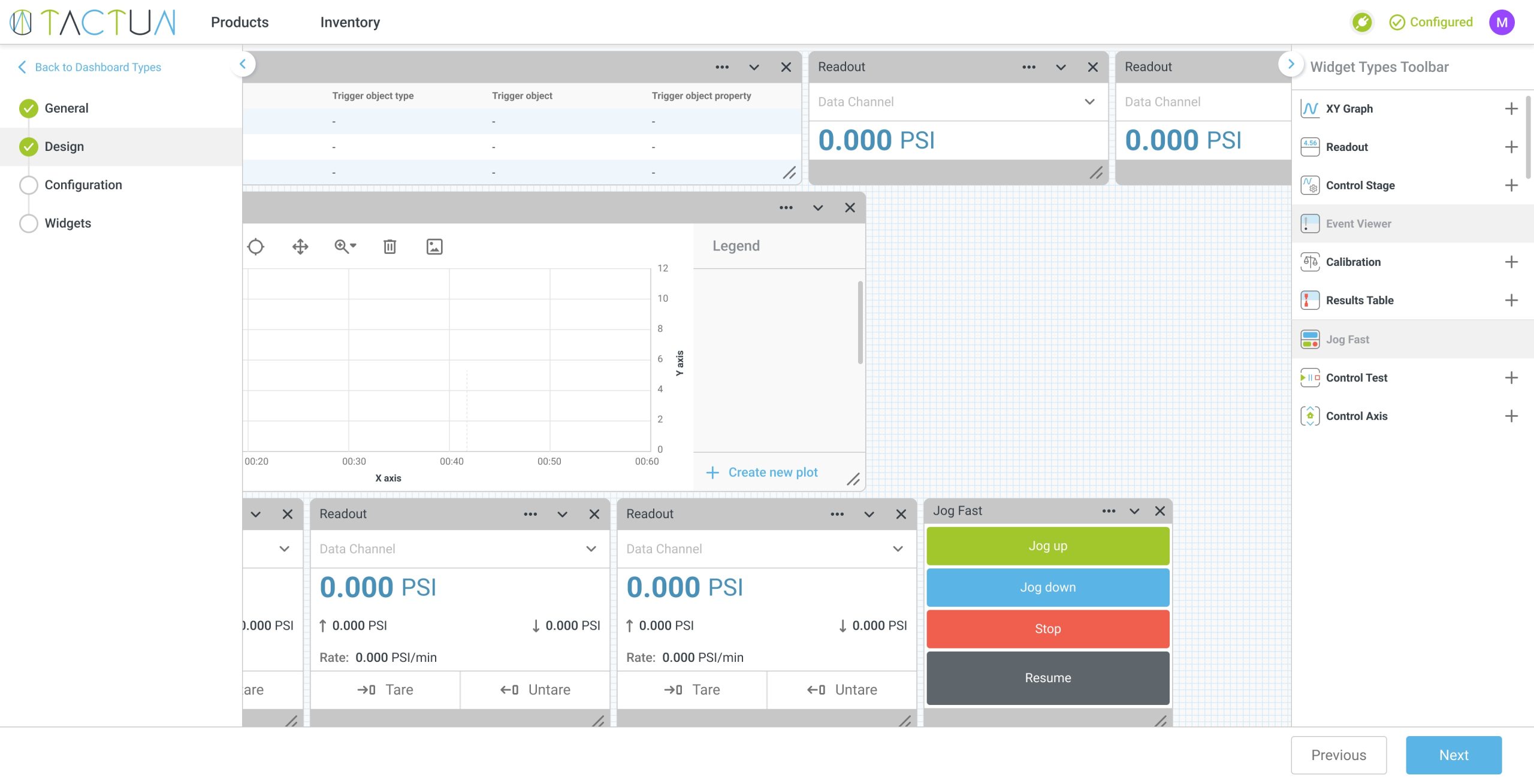
Every capability below ships in the platform today and is configured visually — no programming. The platform doesn't ship fixed tests: it gives your team the building blocks to create your own test methods to ISO, ASTM and EN — quickly, and without writing code.
Drag and drop widgets — readouts, XY graphs, test panels, buttons, numeric fields — onto a canvas to build the operator screens for your machine.
Build your own test methods to ISO, ASTM and EN — tension, compression, flexure and, on the Dynamic plan, fatigue — from configurable stages, with looping and start/stop/pause logic. You author the method; nothing is pre-canned.
Build machine behavior from triggers, conditions and actions — e.g. on a digital input or test event, check a condition, then drive an axis, log, or change state. No code.
Create custom formulas from math operations, constants, functions, sensor values, measurements and specimen parameters, with invalid entries blocked as you build.
Configure ramp, dwell and constant profiles; the Dynamic plan adds haversine, sine, square and duotonic waveforms for dynamic and fatigue testing.
Built-in calculation types — modulus of elasticity, secant/chord modulus, peak load, energy, measurement-at-break and more — plus tare/measurement actions.
Select sensors and calibrate them (piecewise or linear; actuator calibration on the Dynamic plan). The controller also auto-reads TEDS sensor IDs (IEEE 1451.4).
Configure timed, periodic or peak-and-valley logging, then generate reports and exports for QA and audit purposes.
Define user roles so operators get a simplified view while setup and calibration screens stay restricted to qualified staff.
Brand the app with your name and logo, then compile it into a standalone Windows installer in one click — ready to deploy to the operator PC.
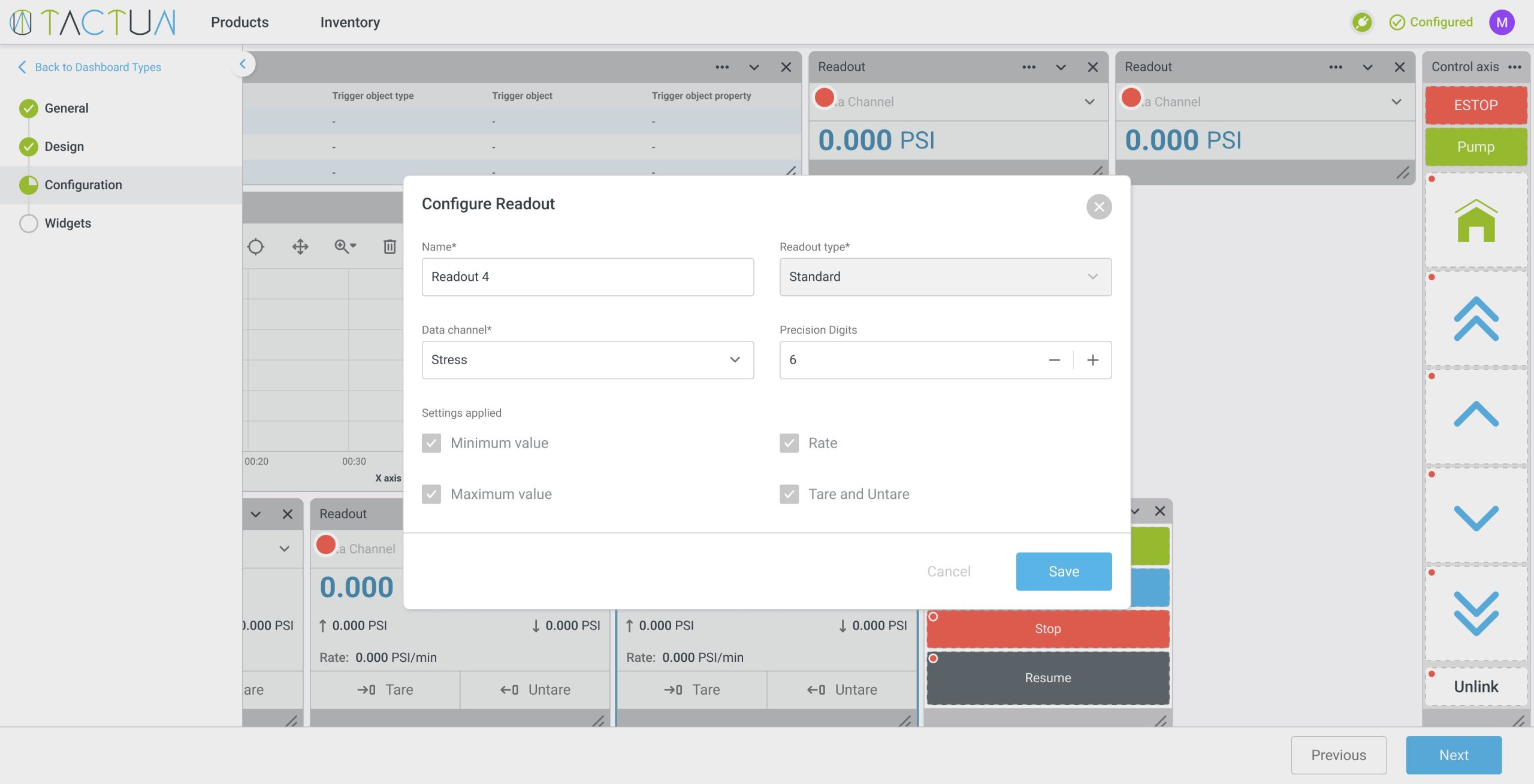
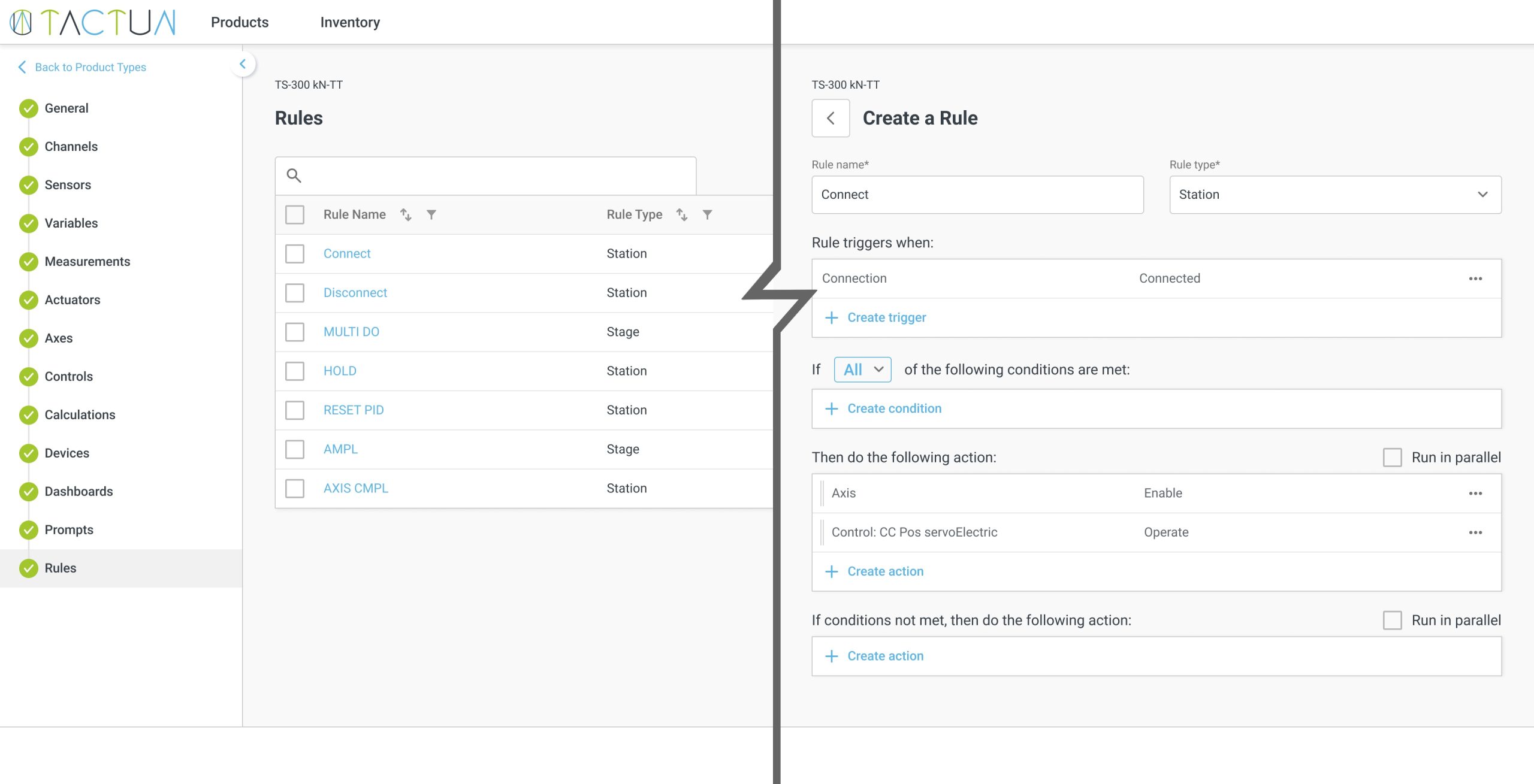
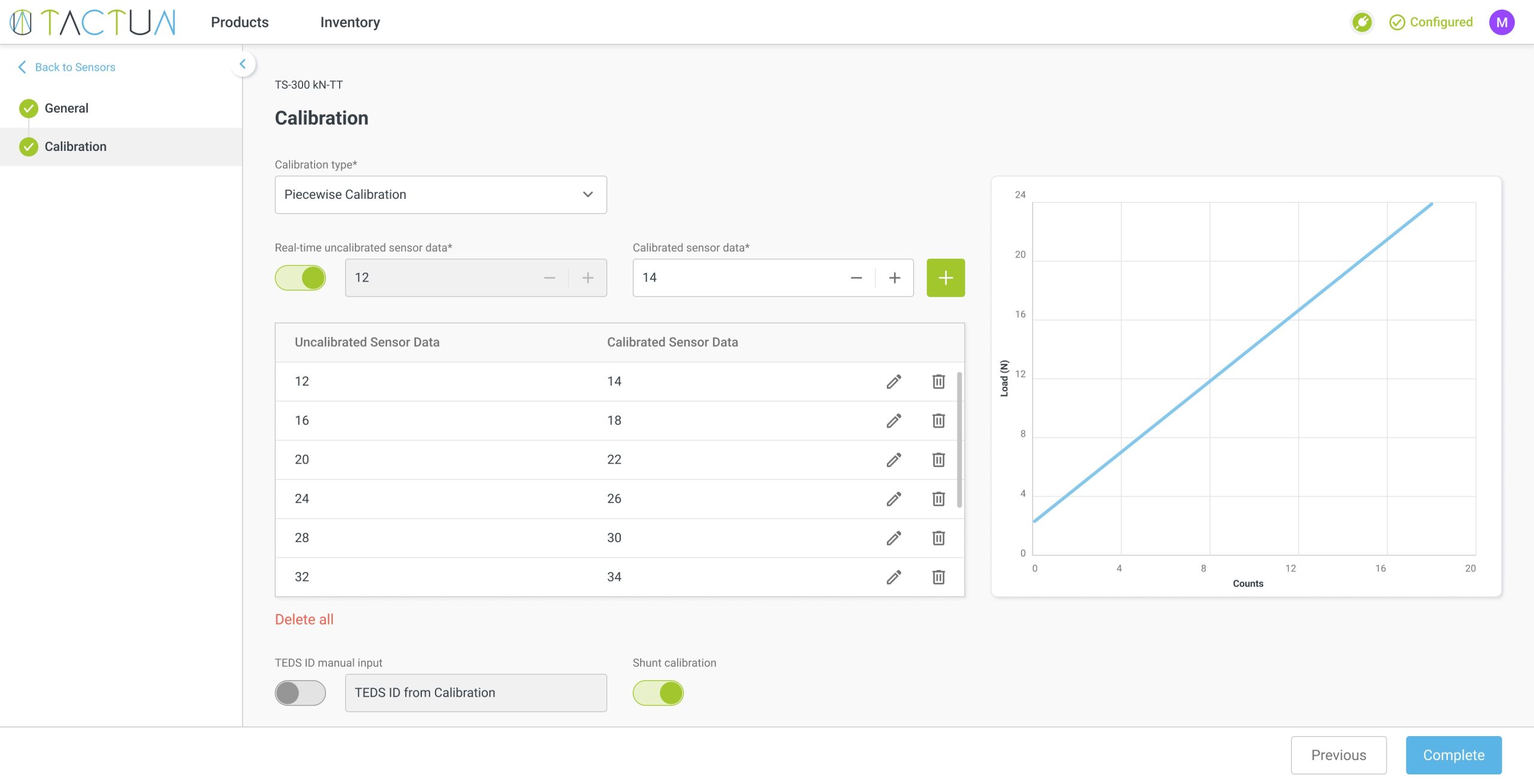
Plans: Static (up to a 2-axis UTM) and Dynamic (up to a 2-axis UTM plus fatigue). Feature availability — e.g. fatigue waveforms, peak-and-valley logging, actuator calibration — depends on the plan. The screenshots above are from the live platform.
The platform separates two jobs cleanly: the controller handles real-time machine control; the software handles configuration, the operator app and your brand.
Design the control logic, dashboards, test methods and calculations for your machine's exact I/O in the visual platform. Reuse the same project across machine models and versions.
The platform compiles everything into a standalone Windows installer, white-labeled with your branding — no software-development tools needed on your side.
Install the app on the operator PC or tablet. It runs fully offline and communicates with the TACTUN controller over Ethernet, auto-detecting it and loading the correct logic.
Issue new app versions over time; the update process is designed to preserve end-user data — calibrations, customers, saved results — while applying your changes.
On-device, real-time: data acquisition, closed-loop control, deterministic logic and motion control — handled by the FPGA-based TACTUN controller.
Configure that controller, build the operator dashboards and test methods, generate and brand the Windows app, and manage users, calibrations and reporting.
Most of the industry gives you either hardware or software — and the powerful platforms still expect you to program. That's a fair description of capable, widely used tools; the difference is who has to write the code.
We're not claiming these platforms can't do the job — they can, and many labs run them well. The point is the engineering effort: TACTUN's full-stack, no-code model is built for machine builders who don't want to staff a controls-software team.
The software pairs with TACTUN's FPGA-based controller (Xilinx Zynq SoC), which performs the real-time data acquisition and closed-loop control. Each controller is custom-designed around your machine's I/O — Wheatstone-bridge load cells, LVDT/RVDT/LVIT displacement, encoders, analog and digital channels, and servo-valve drive — and TACTUN publishes a closed-loop control rate of up to 100 kHz and a Wheatstone-bridge measurement accuracy of ±0.001% of full-scale (±25 mV/V), at 5 V excitation.2
No NRE for controller design — you pay per unit ordered. Custom boards run a 3–5 month lead time; the platform access comes with your controller.
The application builder is licensed per controller, either perpetual (with the first year of support and updates included) or as a multi-year subscription.
The generated app is white-labeled with your logo; the controller board carries your branding while retaining a "Designed by TACTUN" mark.
Ordering, in four steps: submit your machine's I/O (or pick modules) → within about five business days, receive a draft block diagram, per-unit pricing and lead time → approve and get a unique SKU plus platform access → receive the controller, configure it, and deploy your app.
To keep this page honest: today's generated app runs offline. Optional cloud connectivity for remote access and over-the-air updates is an opt-in feature on the roadmap, and a new controller class with on-device AI compute has been announced as coming soon. We'll describe those as available only when they ship — they aren't part of the present-day product.
It's a cloud-based no-code application builder for materials testing machines. A machine builder visually configures the control logic, dashboards, test methods and calculations, then generates a white-labeled, standalone Windows app that runs the machine. The app pairs with a TACTUN FPGA-based controller that performs the real-time control.
No. You configure instead of program — there's no C, ladder logic or LabVIEW to write, and no need for an in-house controls-software team. Your engineers author the test methods and screens visually, and the platform compiles them into the finished application.
Both stages are involved: the builder (where you design and generate the app) is cloud-based, but the app it produces is a standalone Windows application that runs fully offline — no internet, cloud connection or runtime required. It communicates with the controller over Ethernet and auto-detects it.
Yes. The generated app is white-labeled with your company's name and logo. The controller board carries your branding as well, while retaining a "Designed by TACTUN" mark.
You build them — and that's the point. TACTUN doesn't ship fixed, pre-certified tests; the platform gives your team the building blocks — test stages, waveforms, calculations and rules — to create your own methods to ISO, ASTM and EN, visually and without code, typically in minutes rather than a coding project. Built-in calculation types (modulus of elasticity, secant/chord modulus, peak load, energy, measurement-at-break and more) speed that up. You define the method; the controller runs it deterministically.
The application builder is licensed per controller — either perpetual (with the first year of support and updates included) or as a multi-year subscription. There's no engineering fee; you pay per controller, and custom boards run a 3–5 month lead time. Your proposal gives firm figures for your machine.
You can issue new app versions over time, and the update process is designed to preserve end-user data such as calibrations and saved results. Remote access, over-the-air updates and on-device AI are on the roadmap (optional / coming soon) — today's app runs offline.
Tell us your machine type, channels and the standards you test to. We'll show you the no-code builder, scope a controller to your I/O, and walk through generating your branded operator app — zero engineering fee, pay per unit.
TACTUN Inc uses third-party cookies for analytical and personalization purposes, as well as to show you advertising related to your preferences based on your browsing habits. You can accept all cookies by selecting the "Accept" option. You can also set and/or refuse the installation of cookies by selecting "Cookie settings" option. You can find more information in our Cookie Policy.